As much as we’d love to provide answers to every Outer Banks vacation question right here on our website, we know vacation plans have a way of changing in real time.
One minute you’re looking for the closest beach access. The next, someone wants seafood, someone else wants pizza, the dog wants to be included, and suddenly you’re standing in the driveway asking, “Okay… where are we actually going?”
That’s where Ask Maps in the Google Maps app can come in handy.
Ask Maps lets you ask questions directly inside Google Maps and get suggestions based on your location. Instead of scrolling through endless listings, reviews, and menus, you can ask something specific like:
“Are there dog-friendly restaurants near me?”
“What can we do nearby if it rains?”
“Where is the closest public beach access?”
“What restaurants have outdoor seating?”
“What’s open now?”
You can even ask follow-up questions to narrow things down, which is especially helpful when your group is hungry and decision-making skills are rapidly leaving the chat.
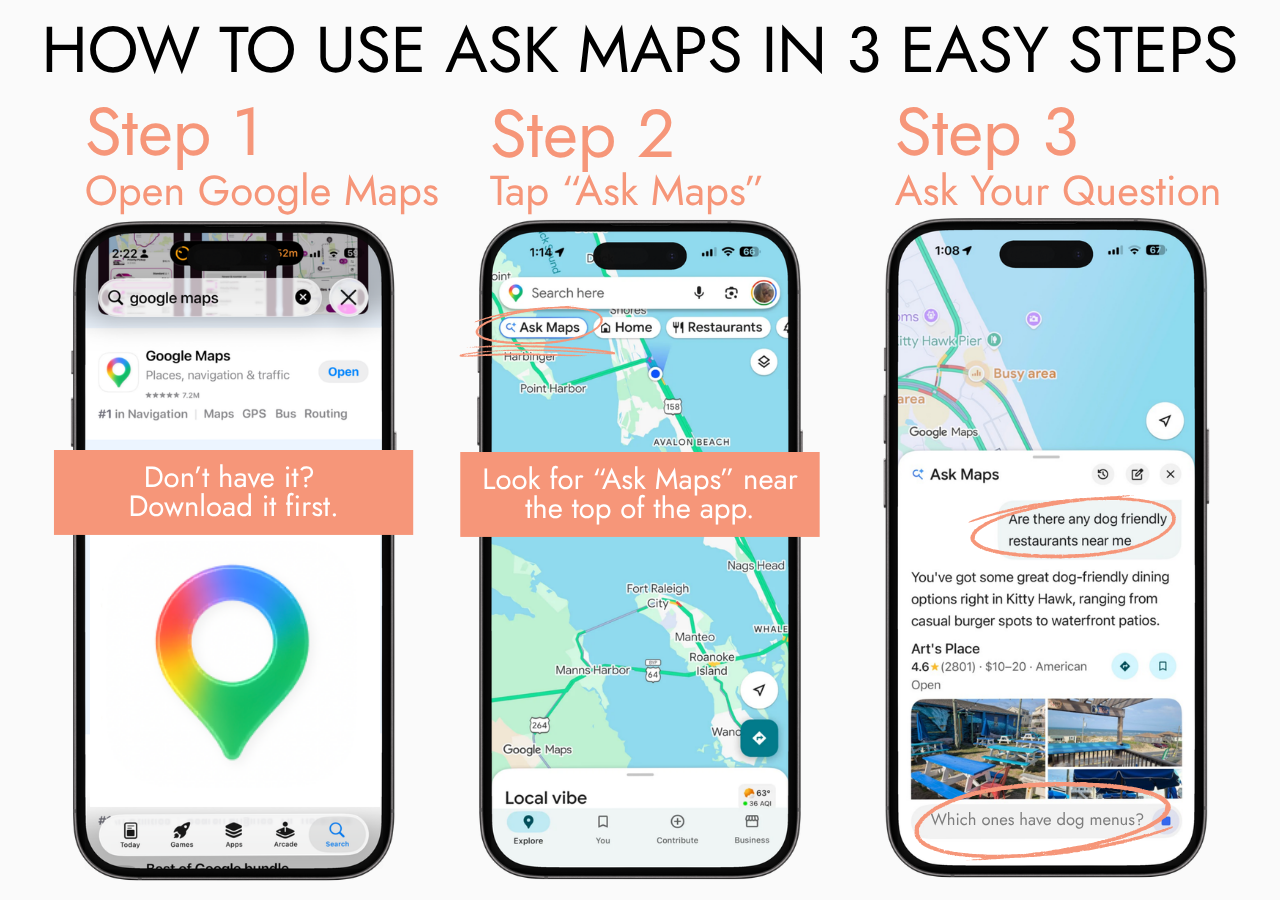
Use the graphic below for a quick walk-through:
Step 1: Open the Google Maps app.
Don’t have it yet? Download it first.
Step 2: Tap “Ask Maps.”
Look near the top of the app for the Ask Maps option.
Step 3: Ask your question.
Try a specific question like, “Are there dog-friendly restaurants near me?” or “What are some rainy-day activities nearby?”
Of course, we always recommend double-checking business hours, seasonal schedules, pet policies, and wait times before heading out. Things on the Outer Banks can change quickly — tides, traffic, restaurant hours, your family’s dinner preferences… all of it.
Whether you’re searching for coffee, dinner, beach access, shopping, rainy-day fun, or a place where your four-legged family member can tag along, Ask Maps can be a helpful little vacation sidekick right in your pocket.